USB C KVM Switch 4K@60Hz,Dual Monitor USB C HDMI DP KVM Switch for 1 PC and 1 Laptop Sharing 2 Monitor and 4 USB3.0 Devices, PD Power for Laptop with Wired Remote Control and USB Cables Included(4K 1 PC+1 Laptop 2 Monitor USB C HDMI KVM)
$116.99
🌸 Cute & Stylish Hair Accessories
🚚 Free Shipping on $116.99 📦 Ships in 3–5 Days
🔍 Carefully Inspected 💫 21-Day Returns
Product details
Operation Mode: ON-ON
Current Rating: 2 Amps
Operating Voltage: 5 Volts
Contact Type: Normally Open
Connector Type: Plug In
Brand: AOOCOO
Circuit Type: 4-way
Contact Material: Metal
Number of Positions: 4
Control Method: Remote, Touch
About this item
【Dual Monitor KVM, Double Productivity】The docking station KVM switch connects 2 computers(1 laptop+1 desktop) and 2 monitors with 1x USB-C (MST), DP+HDMI inputs and 2x HDMI outputs. Seamlessly switch between your work desk and personal laptop to boost your productivity with this USB-C DP HDMI KVM switch.Note: The USB C port connected to the laptop needs to support video transmission and USB control protocols.
【Dual Monitor KVM Docking Station】Unleash the potential of this KVM switch for 1 laptop and 1 desktop with multiple shared peripheral ports, like 3x USB 3.0, 1x USB-C, 1x PD charge, and 2x HDMI outputs. Make your work from home more convenient and easier than ever before.
【Support 100W PD Fast Charging】The USB C DP HDMI KVM Switch is designed with a PD charging port, which can provide enough power for your laptop during use. Please note: The actual power charged to the laptop is between 73W and 85W, because the KVM itself and the cable will produce some power loss.
【Extension Mode and Copy Mode】Note: Only support mirrored output on macOS. USB-C KVM Switch 2 Monitors supports extension mode and copy mode for Windows laptops and desktops.
【Easy Switching】Plug and play, easy installation, no driver required, two switching methods are provided: press the selection button on the KVM to switch; use the desktop extension button to switch, the KVM Switch can be placed under the desktop or outside the workspace to make the desktop more concise. Note: Keyboard shortcuts (hot keys) are not supported for switching
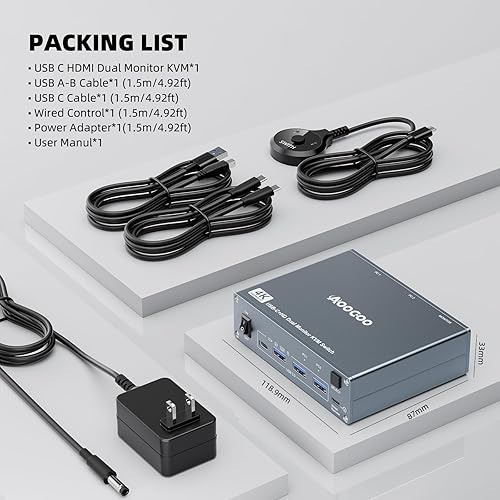
【Packing List】 USB C DP HDMI KVM Switch, 1 USB C cable for audio and video signal transmission, 1 USB3.0 cable, 1 DC12V power adapter, 1 wired controller, instruction manual
There are no reviews yet.
Comment on "USB C KVM Switch 4K@60Hz,Dual Monitor USB C HDMI DP KVM Switch for 1 PC and 1 Laptop Sharing 2 Monitor and 4 USB3.0 Devices, PD Power for Laptop with Wired Remote Control and USB Cables Included(4K 1 PC+1 Laptop 2 Monitor USB C HDMI KVM)"