Backlit Replacement Remote Control for vSeeBox V3 Pro & V5 Pro – Bluetooth Voice Command Remote Compatible with vSeeBox V1 Pro, V1 Max, V2 Pro, V3 Plus, Elite
Compatible with vSeeBox Models – Works seamlessly with vSeeBox V5 Pro, V3 Pro, V3 Plus, V2 Pro, V1 Pro, V1 Max, and Elite devices for quick plug-and-play setup.
Backlit Buttons for Easy Use in Low Light – Navigate your vSeeBox effortlessly in the dark with illuminated buttons designed for nighttime convenience and enhanced visibility.
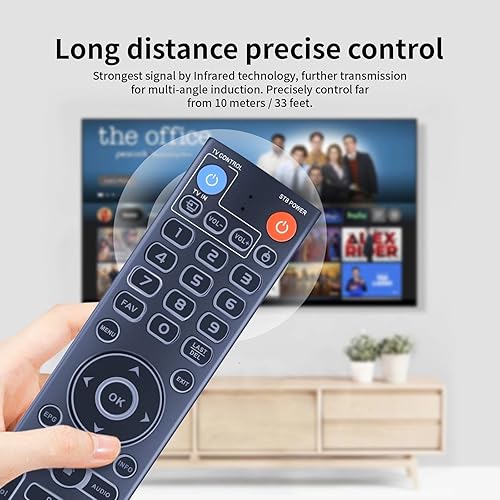
Bluetooth Remote with Reliable Connectivity – Equipped with advanced Bluetooth technology for fast, stable, and long-range signal performance. Control your vSeeBox device effortlessly from anywhere in the room.
Voice Command Functionality – Use voice search and hands-free navigation with built-in voice control (compatible with Google Assistant) on select models. Note: Voice feature not supported on V1 Max, V1 Pro, or V2 Pro.
Quick Access Shortcut Keys – Includes four customizable hot keys for instant access to your favorite apps, enhancing user convenience and efficiency.
Universal TV Compatibility – Program the remote to control your TV’s power and volume, eliminating the need for multiple remotes.
Comfortable and Ergonomic Design – Designed for extended use with a lightweight body, intuitive button layout, and soft-touch feel for easy navigation and control.
Dual Mode Functionality – Features V3 and V2 working modes. Hold “5” for 10 seconds to switch modes. Default is V3 mode (for V3 Pro); switch to V2 mode for compatibility with V1 Pro, V2 Pro, Max, and Elite models.
Easy Bluetooth Pairing Instructions – For V1 Pro, V2 Pro, Max, and Elite: Hold “OK” + “VOL–” for 5 seconds until LED blinks. Go to System Settings → Bluetooth → Pair New Device → Select “vSeeBox Remote” to connect.
Battery Powered for Long-Lasting Use – Uses 2 AAA batteries (not included) to deliver consistent performance and long battery life.
There are no reviews yet.
Comment on "Backlit Replacement Remote Control for vSeeBox V3 Pro & V5 Pro – Bluetooth Voice Command Remote Compatible with vSeeBox V1 Pro, V1 Max, V2 Pro, V3 Plus, Elite"